• Documentation
  • FAQ’s
  • Documentation
  • FAQ’s

Product Offer

home/Documentation/Product Offer
  • Installation
  • Enabling buttons
  • Feed
  • Manage Users

Manage Users

329 views December 3, 2019 admin 0

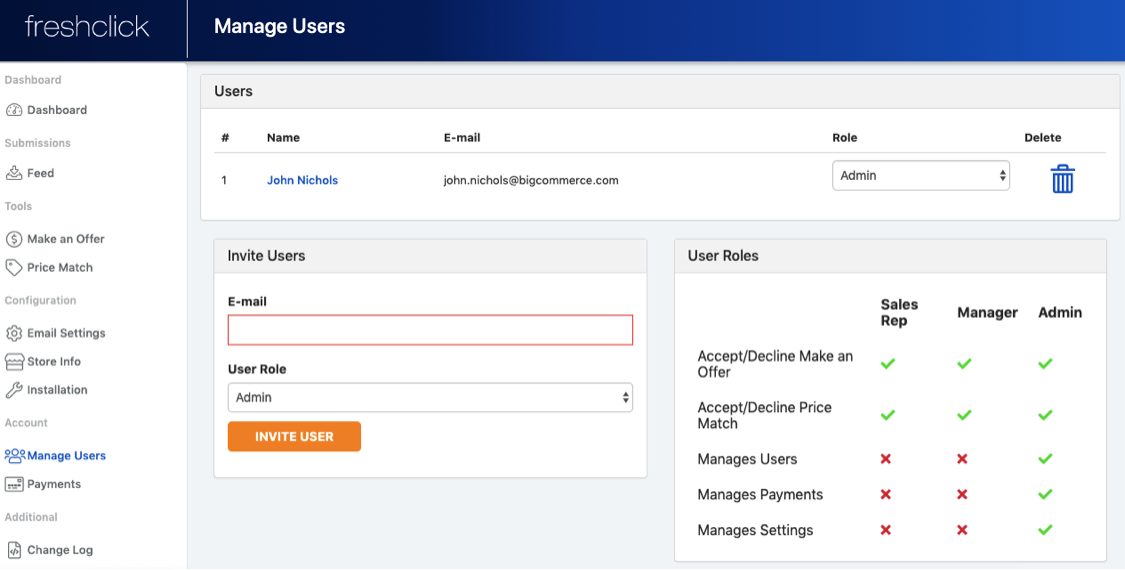
Under the ‘account’ heading in the side bar click into ‘Manage users’ to view employees that are registered on the app.  You can also allocate them a ‘role’ that will give them access to different areas of the system.

 How to add a user

Go to the ‘Invite users’ section. Here you can add an employee using their email address and allocate them a role.

The ‘User roles’ section shows the access each user role has to different areas of the system
Related Articles
  • Feed
  • Enabling buttons
  • Installation

Support staff monitor the community forum and email 9 AM - 6 PM, Sunday to Friday. Please be patient when posting an issue as staff may not be in the same timezone as you.

© 2018 <a href="http://wpsmartapps.com">wpsmartapps.com</a>. All Rights Reserved.